
What is the match center?
The match center is a box on the home page with three tabs: Yesterday, Today and Tomorrow. Each match is one full-width row: the home team’s logo and name, then the score or kick-off time with a status under it (“Not started”, “Live now” or “FT”), then the away team. Under the row, a line shows the channel, commentator and competition. If you add a post link to a match, its card opens that post on click.
- When does the tab appear? With the Sports template, or when you use the Sports header on another template. The match center itself works on the Sports template; with only the Sports header you get just the “Header scores bar” group.
- Paid version: the whole tab is locked during the trial, and the match center doesn’t show on the blog until you activate.
Where do the matches come from?
| Source | How it works | What it provides |
|---|---|---|
| Source 1 | Fetched live in the visitor’s browser, with no keys. | The major leagues and competitions: times, scores, the minute and live status. It refreshes every minute during live matches while the page is open. |
| Source 2 | Fetched by the panel in your own browser and saved with your settings on Apply. | Arabic competitions not covered by source 1 (such as the Egyptian league), plus the channel and commentator for matches. |
| Manual | You enter it in the panel or in Layout. | Any match missing from both sources. |
Important about source 2: the extension fetches it in your browser and saves it with your settings. It refreshes automatically on every “Apply to blog” (today’s matches are fetched fresh; yesterday and tomorrow come from the last fetch), and also whenever you open the “Yesterday/today/tomorrow matches” list. Results don’t update live for visitors: they keep the status and score from your last Apply. So if you rely on source 2 competitions, click Apply once or twice on match days. Fetching works from the computer extension only.
Yesterday, today and tomorrow: how days and times work
What visitors see: “Yesterday”, “Today” and “Tomorrow” tabs, with a pulsing red dot on “Today” when a match is live. On wide screens matches show as cards in two columns; on phones in one column, with long league names on two lines.
- In the visitor’s time zone: “Today” is the visitor’s own day, and times show in their device’s time zone. A visitor in Riyadh and one in Casablanca each see the kick-off in their own local time.
- Manual matches take the time in your own time zone; the theme saves your zone with it and converts it for every visitor.
- Order in the box: pinned first, then live, then upcoming, then finished.
- Who gets in on a busy day? When there are more matches than the maximum, pinned matches come first, then manual ones, then Arab national team matches, then your league order.
- Show all: after 10 matches a “Show all matches” button appears.
- A day without matches: shows a “no matches” line. If there are no leagues and no manual matches at all, the whole box hides.
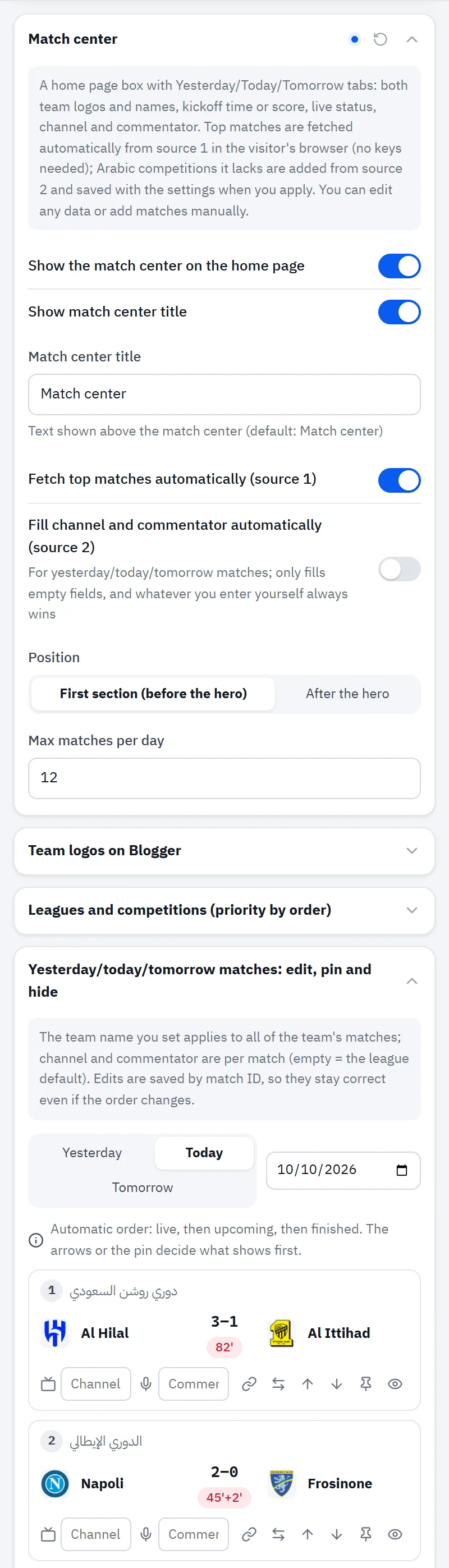
Match center settings
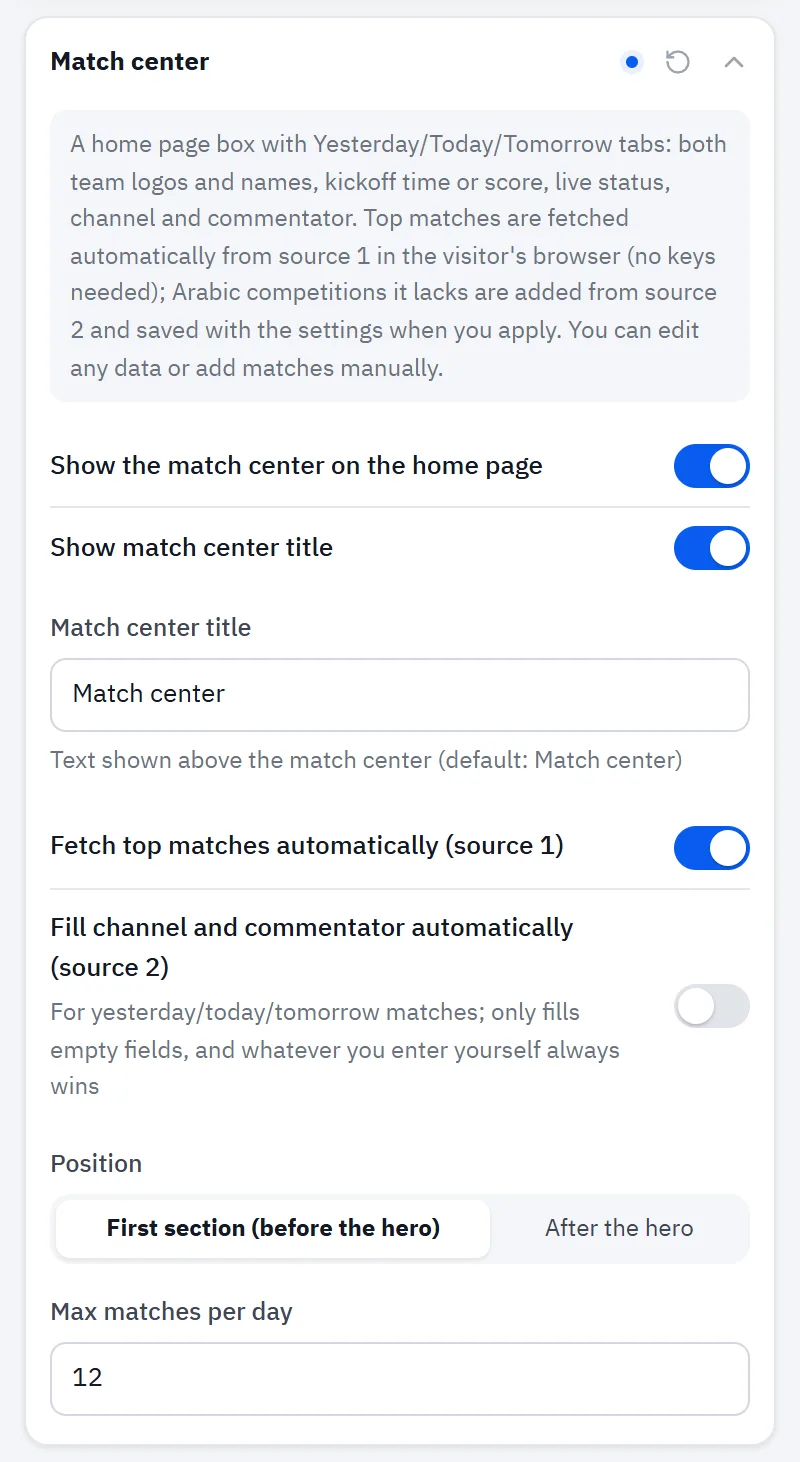
- Show the match center on the home page
- On in the Sports template.
- Show match center title
- On. Turn it off for a box without a heading.
- Match center title
- The text above the box. Default: “Match center”.
- Fetch top matches automatically (source 1)
- On. When it is off, the center shows manual matches only.
- Fill channel and commentator automatically (source 2)
- On. It only fills empty fields, for yesterday’s, today’s and tomorrow’s matches. Whatever you type yourself always wins.
- Position✓First section (before the hero)After the hero
- At the top of the home page, or under the first block.
- Max matches per day
- 4 to 24, default 12.
Leagues, competitions and their order
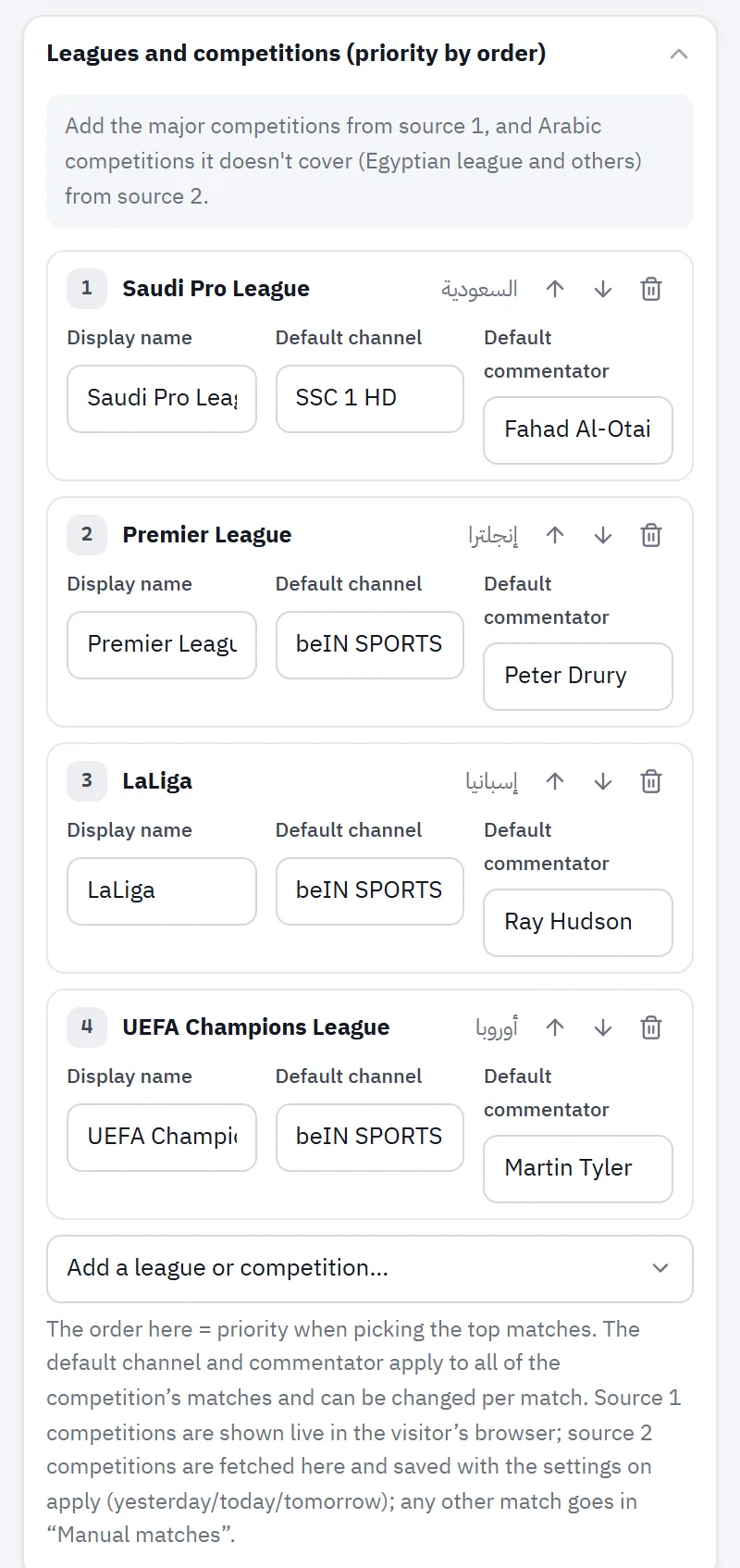
A numbered list. The order is the priority: on a busy day, matches from the higher league are picked first. Each competition has three fields: “Display name”, “Default channel” and “Default commentator”. The default channel and commentator apply to all of that competition’s matches, and you can change them for any single match.
The default list has 20 competitions, starting with the UEFA Champions League, the Premier League, LaLiga, the Saudi Roshn League, the CAF Champions League and the AFC Champions League Elite, then Serie A, the Bundesliga and Ligue 1, the World Cup, the continental cups and their qualifiers, and international friendlies.
Recipe: pick which leagues show first
Remove what your audience doesn’t follow
Use “Remove from the center” next to any competition.
Add what is missing
From “Add a league or competition…” choose from three groups: “Source 1 — live in the visitor’s browser”, “Source 2 — suggested (Arabic, not available in source 1)” such as Egypt’s league and cup, the Algerian, Moroccan and Tunisian leagues, the Qatar Stars League, the ADNOC Pro League, and the Kuwaiti and Iraqi leagues, and “Source 2 — all competitions”.
Reorder with the arrows
“Up (higher priority)” and “Down”. Put your country’s league at the top.
Enter the default channel and commentator
For example “beIN SPORTS” for the Premier League, then click Apply.
Team logos on Blogger
The theme only shows logos hosted on Blogger itself, never images from outside sites. A team without a logo shows the first letter of its name. The panel uploads missing logos for you:
- Automatically: the “Upload missing logos automatically” switch (on) uploads them in the background as soon as you open the matches, into a draft called “Nabd images”, in a small window that closes itself. Don’t publish that draft. Each team is uploaded only once.
- Status line: “Teams in yesterday’s/today’s/tomorrow’s matches: … — on Blogger: … — missing: …”, with Check missing and Upload missing now buttons.
- Your own logo: click a missing team’s name, or a team logo in the matches list, then paste a link or use “or pick an image from your device”. The image is uploaded to Blogger, and automatic uploads never replace your choice.
- Manual alternative: “Download missing pack” gives you a ZIP; insert its images into a “Nabd logos” draft via “New post”, then click “Read logos from draft”. This needs an OAuth Client ID from the Developer tab (steps).
The first time only, a small window may show a note saying “Click New post”. Click it and the rest continues by itself. Then click Apply so the logos appear on the blog.
Editing, pinning and hiding matches
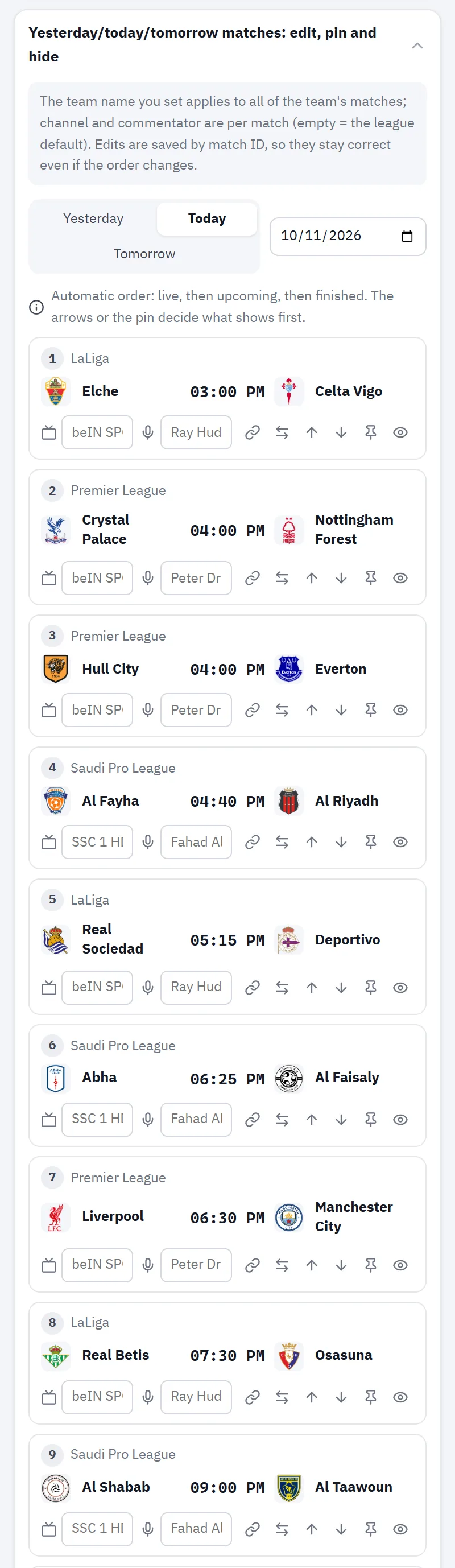
The “Yesterday/today/tomorrow matches: edit, pin and hide” group lists the matches in their real display order in the box. Pick a day with “Yesterday/Today/Tomorrow”, or another date from the calendar to prepare early. Each row’s number is its position, and it turns red when it is beyond the maximum.
- Team name: click it to edit. The new name applies to all of that team’s matches.
- Channel and commentator: two fields per match. Empty ones take the league default or the source 2 value.
- Post link: “Add a post link (the card opens it on click)”, for example a match report.
- “Swap the teams’ order” if the home team shows on the away side.
Recipe: pin or hide a match
Open the day
Choose “Today”, for example, and wait for the matches to load.
Pin the big match
Click the pin, “Make it first in the center”. It is tagged “Pinned”. The up arrow on any other match pins it above the automatic ones. Order pinned matches with the arrows; the down arrow on the last pinned match unpins it.
Hide what you don’t want
Click the eye, “Hide from the center”. It is tagged “Hidden”; click again to show it.
Click Apply
Edits are saved by match ID, so they stay correct even if the order changes. They are removed automatically after 3 days.
Adding a match manually
For any match missing from both sources. It shows alongside the automatic matches on its day.
Click “Add a manual match”
In the “Manual matches” group.
Enter both teams and their logos
“Home team” and “Away team”, plus “Home team logo (image link)” and the away logo. An outside link is uploaded to Blogger automatically.
Set the day and time
“Day” (Today, Tomorrow or Yesterday), or “Specific date (instead of today/tomorrow)”, and “Time” such as 21:00 in your time zone.
Fill in the rest
“Competition”, “Channel”, “Commentator” and “Post link”. After the match, set “Status” to “Full time”, enter the “Score (e.g. 2-1)”, then Apply.
From Layout too: in the “Today’s matches” gadget (the “Sports: today’s matches” section), write one line per match, such as Al Ahly vs Zamalek | league: Egyptian Premier League | time: 21:00 | channel: … | commentator: … | date: tomorrow, or with a score: Al Ahly 2-1 Zamalek. A line without a day counts as today.
The scores bar in the header
The Sports header has a scores bar under the competitions bar, showing up to 12 of today’s matches: both teams, the score or time, and “Live” or “FT”. When a match is live, a red mark pulses next to the bar’s title. The bar shows only when it has data, and it hides on pages that show the match center so the matches aren’t repeated.
Its sources are the “legacy” ones, not the match center:
- The “Today’s matches” gadget in Layout
- Today’s lines from it appear in both the bar and the match center. The gadget’s title becomes the bar’s title (default “Results”).
- Header scores bar (legacy)
- In the panel: “Home team”, “Away team”, “Home goals”, “Away goals”, “Status”, “Competition”, “Report link”, and an “Add match” button. Shown with the Sports header only.
- Scores JSON URL (optional)
- For advanced users: a JSON file URL in the form
[{"home","away","hs","as","status":"live|ft|20:00","comp","url"}], read in the visitor’s browser.
Troubleshooting
The match center doesn’t show on the home page
Check that “Show the match center on the home page” is on, that the list has leagues, and that you clicked Apply. Remember it is a paid feature and doesn’t show during the trial.
The box says there are no matches
There are no matches in your chosen leagues that day. Add more competitions, or a manual match.
Teams show a letter instead of a logo
Their logos aren’t on Blogger yet. Open the Matches tab, click “Check missing” then “Upload missing now”, then Apply.
Egyptian league matches are old or have no score
Source 2 competitions refresh on every Apply. Click Apply after the matches. If they still look old, open the matches list in the panel, click “Fetch again from source 2” if there is an error, then Apply.
The channel or commentator is wrong
Type the right value in the match’s field. What you type yourself always wins over automatic filling.
The header scores bar doesn’t show on the home page
That is by design: the home page has the match center, so the bar hides to avoid repeating the same matches. You’ll see it on posts and label pages when it has matches.